A friend of mine asked me to create a LaTeX template for lecture notes. He wanted to learn LaTeX by typesetting all of his class notes. I think I created a pretty nice template and wanted to share it with everyone.
You can download the template from here! Happy TeXing!
Showing posts with label latex. Show all posts
Showing posts with label latex. Show all posts
Thursday, August 30, 2012


Tuesday, August 28, 2012
Syntax Highlighting in LaTeX with Minted
Here is a quick tip for those of you who use MacPorts and want pretty syntax highlighting in your LaTeX documents. Recently I discovered a great looking package called minted, which depends on an external python syntax highlighter called Pygments. I couldn't find any decent tutorials online for a quick and easy setup, so I decided to write one. I hope it will be helpful for someone.
To my readers who didn't come upon this article through google, the minted package is a better alternative to the listings package. Minted allows you to present code in techno-color! This means the programs you have worked hard on, like:
int main() {
printf("hello, world");
return 0;
}
will no longer be restricted to marginalizing black and white:

With minted your code will finally be noticed in the appendix of that report...

Disclaimer: Minted can do many things, but it will not make bad programs work. Though it will make them look like they could work.
To my readers who didn't come upon this article through google, the minted package is a better alternative to the listings package. Minted allows you to present code in techno-color! This means the programs you have worked hard on, like:

With minted your code will finally be noticed in the appendix of that report...

Disclaimer: Minted can do many things, but it will not make bad programs work. Though it will make them look like they could work.
Thursday, November 10, 2011
Batman Letterhead in ScribTeX
As soon as I made my last post, I got a few emails asking how to use LaTeX to create the Batman letterhead.

Through the magic of "the cloud," there is an easy way to play with the letterhead I created without downloading LaTeX. First, download the source file, here.
There is a great website called ScribTeX that allows the compilation of TeX files through the website. Signing up is painless and free. Once you have signed up and logged on, you will see the Dashboard page. Click on New Project and you will be asked to name the new project. I chose the name "Batman Letterhead."

Then upload the TeX file containing the letterhead.

For the TeX file to compile properly, you must change the compiler to latex from ScribTeX's default pdflatex compiler. The pdflatex compiler compiles directly to a pdf. The latex compiler will create a postscript file before creating a pdf. The packages used to plot the Batman logo (pstricks and pst-plot) only make sense to postscript files and cannot be used with pdflatex. To change the compiler, click on "Settings" from the project page then the "Compiler Settings" tab. After choosing latex, click "Save" then "Files."
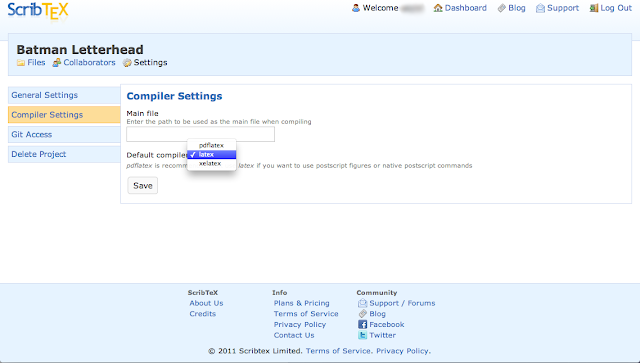
Now open the uploaded TeX file and you will see that it is the same file as my previous post with one major difference. Instead of using a separate file containing the data points, this one has the data points stored within.

To compile the letterhead, click "Compile" and a new window will open with the compiled PDF.

The TeX file used in this post can be found here. Enjoy TeXing as Batman!
Through the magic of "the cloud," there is an easy way to play with the letterhead I created without downloading LaTeX. First, download the source file, here.
There is a great website called ScribTeX that allows the compilation of TeX files through the website. Signing up is painless and free. Once you have signed up and logged on, you will see the Dashboard page. Click on New Project and you will be asked to name the new project. I chose the name "Batman Letterhead."

Then upload the TeX file containing the letterhead.

For the TeX file to compile properly, you must change the compiler to latex from ScribTeX's default pdflatex compiler. The pdflatex compiler compiles directly to a pdf. The latex compiler will create a postscript file before creating a pdf. The packages used to plot the Batman logo (pstricks and pst-plot) only make sense to postscript files and cannot be used with pdflatex. To change the compiler, click on "Settings" from the project page then the "Compiler Settings" tab. After choosing latex, click "Save" then "Files."

Now open the uploaded TeX file and you will see that it is the same file as my previous post with one major difference. Instead of using a separate file containing the data points, this one has the data points stored within.

To compile the letterhead, click "Compile" and a new window will open with the compiled PDF.

The TeX file used in this post can be found here. Enjoy TeXing as Batman!
Batman Letterhead
After reading a post from HardOCP that gave the roots of the Batman symbol, I could not help imagining the letterhead of the world's greatest detective. The letterhead needs to say "Batman is classy."
I created this letterhead using the "Batman equation", Mathematica, and LaTeX. The computer in the Bat Cave is probably Unix-based and cannot use Microsoft Word. Therefore, Batman must use LaTeX. The first step to creating this letterhead is to plot the symbol. A post from Playing With Mathematica has done this for me already with seven simple lines.


To extract the points used for the final plot the following command must be executed for each root equation.

After extracting and compiling all data points into one .dat file, we are ready to create the letterhead in LaTeX. The following LaTeX code relies on the pstricks and pst-plot packages. It plots the points in the saved data file and creates the bar that separates Batman's contact information.
\begin{document}
\readdata{\BatData}{BatData.dat}
\noindent\begin{minipage}[b]{5cm}
\begin{center}
\psset{xunit=0.35cm,yunit=0.5cm}
\begin{pspicture}(0,0)(0,2)
\listplot[plotstyle=dots]{\BatData}
\end{pspicture}
\end{center}
\end{minipage}
\hfill
\begin{minipage}[b]{7cm}
\begin{flushright}
\footnotesize{\itshape 1007 Mountain Drive {\scriptsize$\bullet$} Gotham City, NY 10027}
\end{flushright}
\end{minipage}
\vskip-2mm
{\hspace{40mm}\hfill\rule[0.5mm]{130mm}{0.5pt}}
\vskip-2mm
\hfill
\begin{minipage}[b]{7cm}
\begin{flushright}
\footnotesize{\itshape 555.555.5555 {\scriptsize$\bullet$} \href{mailto:Bruce@WayneCorp.com}{Bruce@WayneCorp.com}}
\end{flushright}
\end{minipage}

I created this letterhead using the "Batman equation", Mathematica, and LaTeX. The computer in the Bat Cave is probably Unix-based and cannot use Microsoft Word. Therefore, Batman must use LaTeX. The first step to creating this letterhead is to plot the symbol. A post from Playing With Mathematica has done this for me already with seven simple lines.

The Show function is used to overlay the six plots to reveal the desired product.

To extract the points used for the final plot the following command must be executed for each root equation.

After extracting and compiling all data points into one .dat file, we are ready to create the letterhead in LaTeX. The following LaTeX code relies on the pstricks and pst-plot packages. It plots the points in the saved data file and creates the bar that separates Batman's contact information.
\begin{document}
\readdata{\BatData}{BatData.dat}
\noindent\begin{minipage}[b]{5cm}
\begin{center}
\psset{xunit=0.35cm,yunit=0.5cm}
\begin{pspicture}(0,0)(0,2)
\listplot[plotstyle=dots]{\BatData}
\end{pspicture}
\end{center}
\end{minipage}
\hfill
\begin{minipage}[b]{7cm}
\begin{flushright}
\footnotesize{\itshape 1007 Mountain Drive {\scriptsize$\bullet$} Gotham City, NY 10027}
\end{flushright}
\end{minipage}
\vskip-2mm
{\hspace{40mm}\hfill\rule[0.5mm]{130mm}{0.5pt}}
\vskip-2mm
\hfill
\begin{minipage}[b]{7cm}
\begin{flushright}
\footnotesize{\itshape 555.555.5555 {\scriptsize$\bullet$} \href{mailto:Bruce@WayneCorp.com}{Bruce@WayneCorp.com}}
\end{flushright}
\end{minipage}
All of the files discussed in this post can be downloaded here, along with a letter Batman would've sent to The Joker.
Wednesday, October 19, 2011
American Psycho Business Cards in Latex
I recently tried to find a latex business card template that was similar in design to the cards seen in American Psycho. I thought Patrick Bateman was the easiest non-Gordon Gekko face saving costume for those Halloween parties, where you are not sure if a costume is required. Because I can explain to my boss why I am carrying a chain saw in my Valentino suit, but not why I am dressed as Frankenstein's monster. I was disappointed that no one had posted a template, but extremely happy for a chance to be the first. I started by borrowing a simple latex business card template from Mike Elery's website. After playing with the alignment and fonts I was able to create a decent Patrick Bateman card.


Here is the tex sourcefile.
 |
| Image from vaultofthebankrobber.blogspot.com |
It was disappointing to discover that there was no Silian Rail font and no accepted RGB or CMYK of bone color. The latex font called Palatino, in my opinion, is the closest matching font to Silian Rail. Since ivory is a bone, I used a ivory background.
The only deviation from the movie prop is my correct spelling of 'Acquisition.' A misspelling I did not notice before my attempt to replicate the card. I think this misspelling was necessary to create the perfect alignment with the company name, which cannot be done simply by shrinking the font or adjusting the letter spacing. It does add an extra symbolic metaphor that gives me a greater appreciation for the movie.
The PDF output was designed for the business card paper I bought on sale. If anyone needs to change the output to Avery's brand paper or any other sizing just leave a comment for help.
For fun here is Bateman's Mr. Hyde version of his business card.
Here is the tex sourcefile.
Subscribe to:
Posts (Atom)